Print 4x6 shipping labels without fighting Acrobat
LabelChop watches your downloads, crops awkward carrier PDFs, and sends clean 4x6 / 100x150mm labels to your thermal printer.
14-day free trial · No credit card · Then $79/year or $9/month
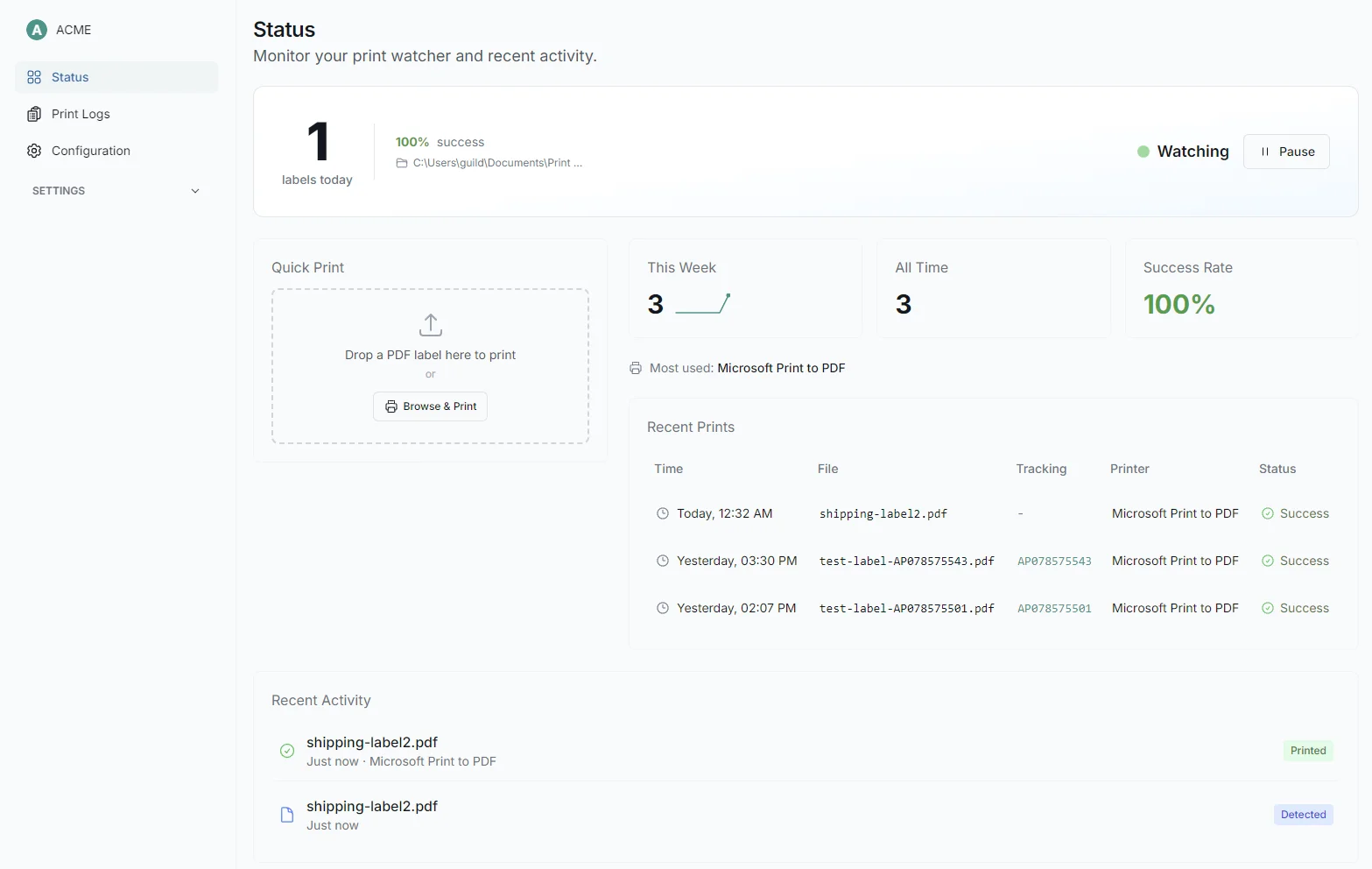
1Watch folder
New label PDF lands in Downloads
2Auto crop
Finds the label and trims the page
3Print clean
Sends a 4x6 label to your thermal printer
YOUR WORKFLOW TODAY VS. WITH LABELCHOP
From 7 steps to 2
Every seller we talked to described the same nightmare: download, crop, resize, print, retry.
BEFORE
~5 min per label
- 1Download an A4 or Letter shipping label PDF
- 2Open Acrobat, Chrome or Preview
- 3Crop, screenshot or resize by hand
- 4Resize it to 4x6 / 100x150mm
- 5Open the print dialog
- 6Guess paper size and margins
- 7Reprint when the barcode lands off centre
AFTER
~3 seconds
- 1Save or download the PDF into your watched folder
- 2LabelChop crops, resizes and prints it automatically
Built for daily shippers
Built for sellers who ship daily
eBay · Shopify · Etsy · marketplace sellers
Home office and small warehouse teams
MyPost, USPS, Royal Mail, and carrier PDF workflows
Carrier and marketplace PDFs
Works with carrier and marketplace label PDFs
When your carrier, marketplace, or fulfilment workflow gives you an A4, Letter, or awkwardly sized PDF, LabelChop crops it to 4x6 / 100x150mm without Acrobat or print-dialog fiddling.
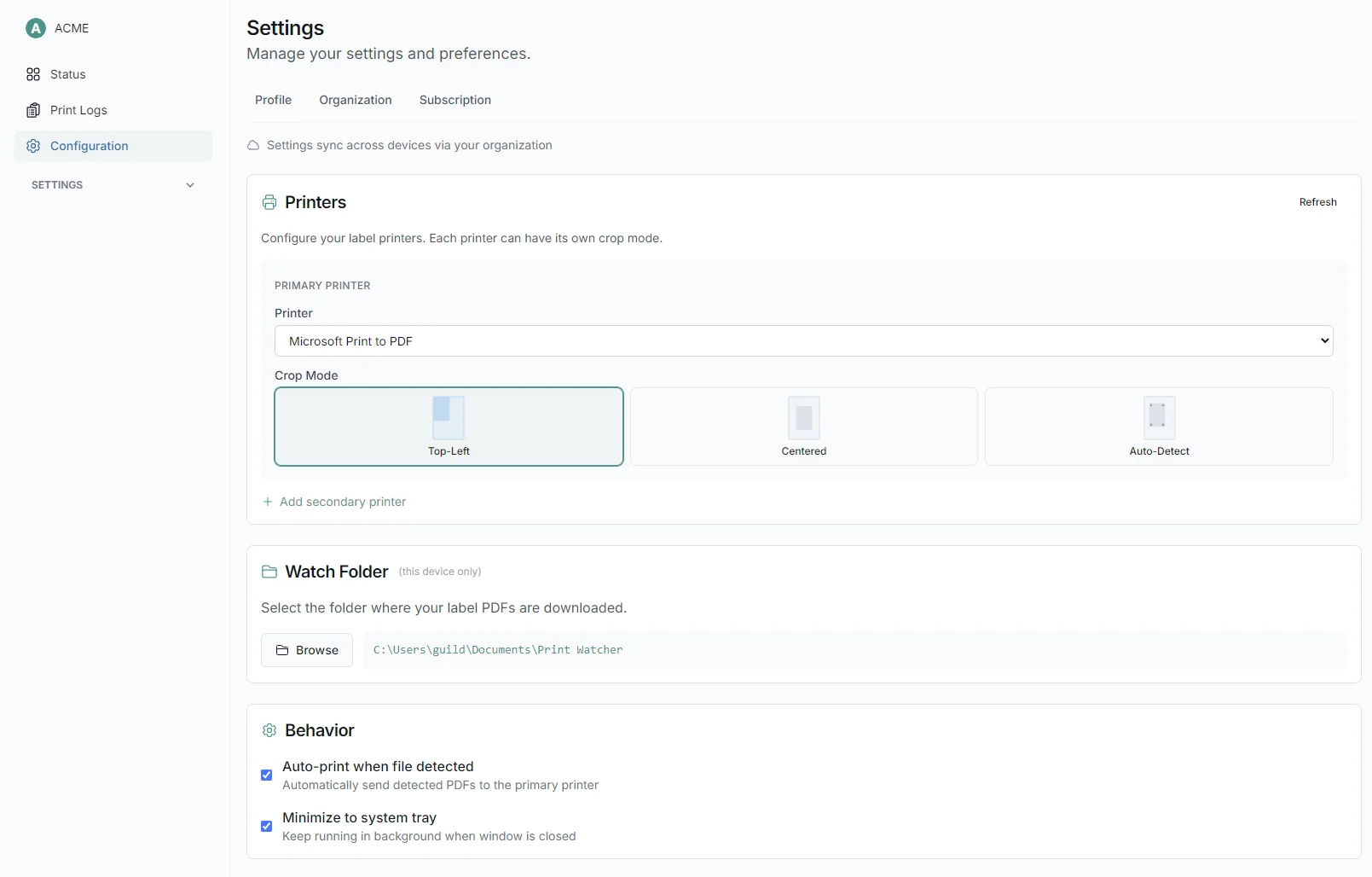
- Auto-detects label position: top-left, centred, or anywhere on the page
- Handles A4, Letter and awkward carrier or marketplace PDF labels
- Outputs 4x6 / 100x150mm labels for thermal-printer workflows
Set once
Set it up once, forget about it
Point it at your Downloads folder, pick your thermal printer, and you're done. LabelChop runs in your system tray: there when you need it, invisible when you don't.
- Choose your watch folder and thermal printer
- Runs quietly in the system tray with zero taskbar clutter
- Works fully offline after activation
FAQ
Frequently asked questions
Covers label size, thermal printer setup, carrier PDFs, labels printing wrong, and the MyPost/AusPost edge cases sellers ask about before downloading.
Is LabelChop only for Australia Post or MyPost Business?
No. LabelChop started with Australia Post and MyPost Business because that was the first painful workflow we solved, but the product is broader: it fixes awkward shipping label PDFs for ecommerce sellers using thermal printers. MyPost is one supported workflow, not the whole category.
Can’t MyPost Business already print A6 labels?
Yes, for many domestic labels MyPost Business can be set to A6 / one label per page. LabelChop helps when you already have an A4 PDF, a marketplace or carrier workflow still outputs A4 or Letter, or you want folder-to-printer automation without opening Acrobat or changing print settings every time.
How do I print A4 shipping labels on a 4x6 thermal printer?
The manual way is to crop, resize, and print at 100% in Acrobat, Chrome, or Preview. LabelChop automates that workflow: it watches your folder, detects the label area, crops the PDF, and sends a clean 4x6 / 100x150mm label to your thermal printer.
What size does LabelChop output?
The core output is 4x6 inches / 100x150mm, the common shipping-label size used by many Dymo, Zebra, Brother, Rollo, MUNBYN, and other thermal-printer workflows.
Does it work with Royal Mail, USPS, eBay, Shopify, or Etsy labels?
LabelChop works with awkward A4 or Letter PDF labels from carrier and marketplace workflows. It is PDF workflow automation, not an official carrier integration, so the safe rule is: if the label arrives as a PDF and the label area can be detected, LabelChop can usually crop it for your thermal printer.
Why does my shipping label print too small, off-centre, or cut off the barcode?
That usually happens when the PDF page size, printer paper size, scaling setting, and physical label stock do not match. LabelChop crops the label to the thermal-label size first, so you are not trying to shrink a whole A4 or Letter page onto one 4x6 label.
Do I need Adobe Acrobat to print shipping labels?
No. The point is to stop opening Acrobat just to crop, screenshot, resize, or fight the print dialog. LabelChop handles the crop-and-print step automatically for supported label PDFs.
What thermal printers are supported?
Any thermal printer that accepts 4x6 or 100x150mm labels and appears as a printer in Windows. Common examples include Dymo 4XL, Zebra GK/ZD series, Brother QL-1110NWB, Rollo, and MUNBYN.
Does LabelChop work offline?
Yes. Cropping and printing happen locally on your computer. Internet is mainly needed for activation and updates, not for sending your label PDFs to a cloud service.
Is there a free trial?
Yes — 14 days, fully featured, with no credit card needed. After that, keep it for $79/year or $9/month if it saves enough time and label waste.
Can I cancel my subscription?
Yes. Cancel anytime from the app. No lock-in, no cancellation fee.
Windows SmartScreen shows a warning. Is it safe?
Yes. This can happen with newer Windows apps before they build reputation. Click “More info” then “Run anyway” if you downloaded LabelChop from the official site.
Clear pricing
Start free. Keep it if it saves the Acrobat fight.
Every plan starts with a 14-day free trial. No credit card required. All prices in AUD.
Monthly
Less than one roll of thermal labels
- Unlimited label printingProcess as many shipping-label PDFs as you need during normal seller workflows.
- Automatic watch folderDrop or download labels into one folder and LabelChop handles the crop-and-print step.
- All thermal printers (Dymo, Zebra, Brother)Built for common 4x6 / 100x150mm thermal-printer setups, including Dymo, Zebra and Brother.
- Auto-crop A4 to 4×6 labelsTurns awkward A4 or Letter carrier PDFs into thermal-label sized output automatically.
- Email supportGet help when a carrier PDF, printer setting, or label layout starts behaving weirdly.
- Cancel anytimeNo lock-in. Keep LabelChop only if it keeps saving you from manual label fixes.
Annual
Less than one wasted label sheet per month
$6.58/mo billed annually
- Everything in monthlyIncludes the same full watch-folder, crop, resize, print and support workflow as monthly.
- 2 months free vs monthlyAnnual billing lowers the effective monthly cost compared with paying month to month.
- Unlimited label printingKeep using LabelChop for daily or weekly shipping without per-label usage fees.
- All thermal printers supportedWorks with common 4x6 / 100x150mm thermal-printer workflows across major brands.
- Email supportSend through problem PDFs or printer questions when labels print strangely.
- Cancel anytimeYou stay in control of the subscription from your account settings.
Prefer a one-time purchase?
Get lifetime access for $149 AUD. No subscription, ever.